Media Formats in HTML
Created: 2022-09-18
Tags: #fleeting
Many terminologies that I don't understand here
Wtf are this belows?
- Container
- Codec
Each audio track is encoded using audio codec,
while video tracks are encoded using a video codec.
For some types of audio,
A codec's data is often stored without a container, or with a simplified container.
- FLAC codec, which is stored most commonly in FLAC files, which are just raw FLAC tracks.
- An audio player will tend to play an audio track directly (MP3 or Ogg file)
Another such situation is the always-popular MP3 file.
An "MP3 file" is actually an MPEG-1 Audio Layer III (MP3) audio track stored within an MPEG or MPEG-2 container.
This is especially interesting since while most browsers don't support using MPEG media in the <video> and <audio> elements, they may still support MP3 due to its popularity.
Contents of a media file
The following below are example of Media Container Formats
- MP3
- MP4
- WebM
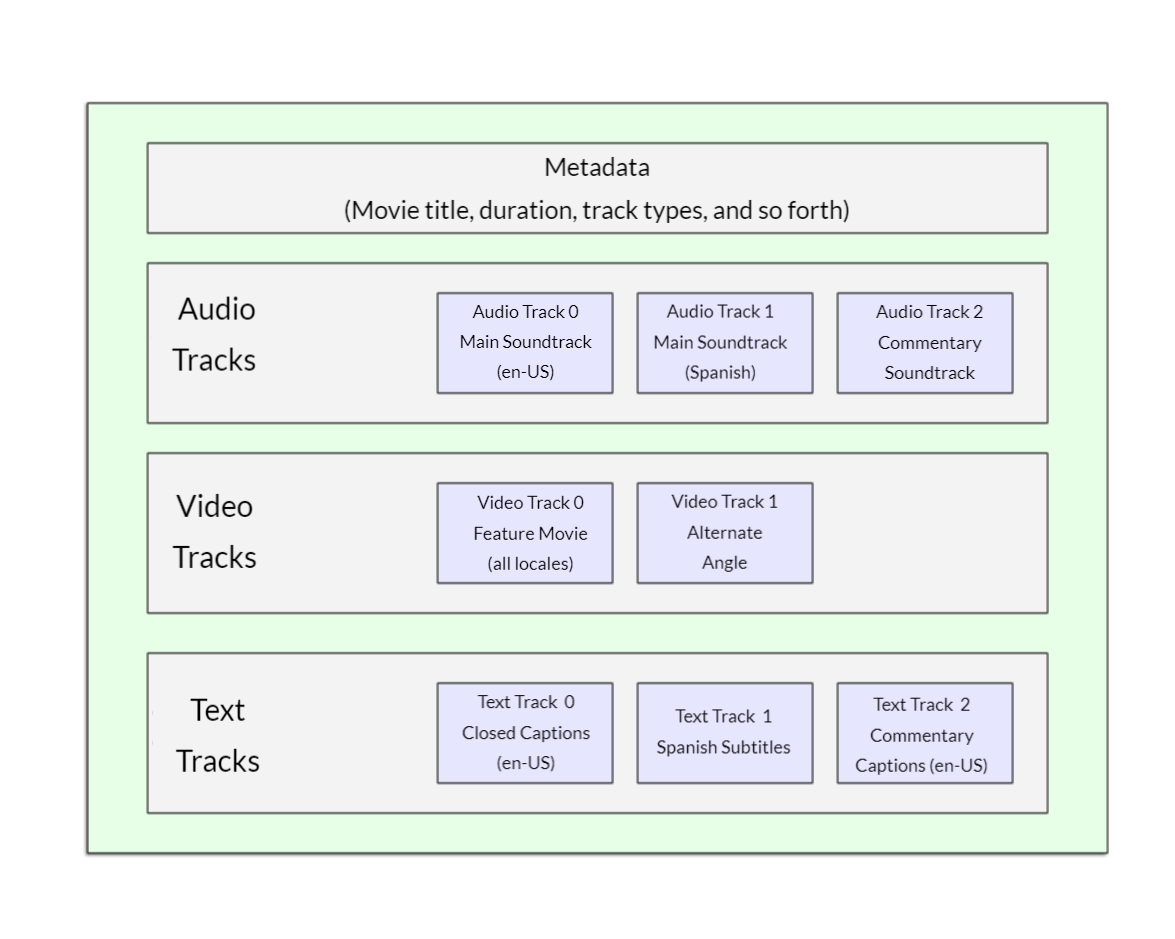
A WebM file containing a movie which has the following:
- Main video track and one alternate angle track
- audio for both English and Spanish,
- text tracks containing closed captions for the feature film,
- Spanish subtitles for the film and English captions for the commentary.
This can be conceptualized as shown in the diagram below.